


OpenTable
4.755.09K Reviews
App Specs
- Version
- 26.25.0
- Updated On
- License
- Free
- Downloads
- 10,000,000+
- Developer
- OpenTable
- Categories
- Food & Drink
- Platform
- Android, iOS
Screenshots

 Analysis by AppCompare
When I’m choosing somewhere to eat, the hardest part is often not picking a cuisine but finding a place and time that work for everyone. OpenTable is most useful when I want to browse restaurants and arrange a reservation without calling around. It is a free food-and-drink app from OpenTable, and its focus is practical: help me turn a loose dinner idea into a plan. The experience depends on having a connection when I search or manage a booking, so I treat it as a planning tool rather than something to rely on if my phone is offline.
When a connection makes the difference
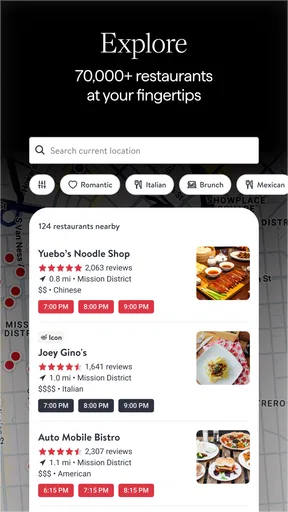
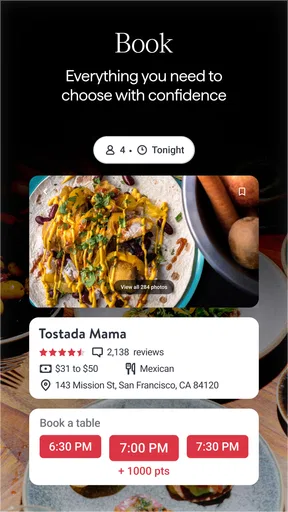
Searching is where the app’s convenience becomes clear. I can explore restaurants by location and cuisine, check available reservation times, and use reviews and ratings to narrow the options. That live availability is particularly helpful when a group has a fixed evening free: instead of calling several restaurants one by one, I can compare the openings that fit the plan. It also means the app is most useful while connected, especially when I’m making a decision that could change as tables are booked.
I would avoid leaving the whole search until the last moment if the occasion matters. A connection lets me check current options, but it does not remove the need to make a timely choice. For a popular dinner time, I’d search early enough to compare alternatives and settle on a suitable slot rather than assume the first restaurant I like will still have availability later.
Useful in everyday mobile situations
The app suits the small decisions that happen while I’m already out: finding somewhere near the area I’m visiting, checking whether a suitable time is open, or arranging a meal while coordinating with friends. Its value is less about replacing every part of a night out and more about reducing the back-and-forth involved in securing a table. Once a reservation is made, the confirmation email and calendar option give me useful ways to keep the plan visible beyond the app itself.
For a realistic example, imagine I’m meeting a friend after work and our preferred restaurant is full at the time we can arrive. I can check other restaurants and time slots, weigh the reviews against the location, and choose a workable alternative while we coordinate. The practical tip is to search with flexibility: if we can shift the time or consider another nearby cuisine, we’re less likely to get stuck on one unavailable choice.
What to do when plans or access change
Plans rarely stay perfect, and being able to modify or cancel a reservation in the app is a genuine convenience. I’d still keep the confirmation email or calendar entry easy to find, particularly if I’m heading somewhere with unreliable reception. Those details provide a useful reference for the plan I already made, while changes themselves are best handled through the app when I have a connection.
There is a trade-off here: convenient booking and management depend on an active connection at the moment I need them. If the app is slow to load or I lose service, I would not assume I can complete a change immediately. I’d try again when connected and use the restaurant’s own contact details if the matter is urgent and I already have them. That is a sensible backup, not a reason to treat the app as unreliable; it simply recognizes that a mobile booking tool cannot control network conditions.
Worth Reading Before You Choose

Flipboard Shows What News Apps Must Do Beyond the Feed

Switching to Android Auto Means Rethinking Your Driving Routine

Google Calendar Makes a Crowded Week Easier to Manage

Ludo King Makes the Most of the Minutes Between Plans

Baby Panda World Brings Quick Play to Modern Phones, but Its Game Library Feels Busy

ESPN’s Live Game View Makes Following Close Games Easier
Using it thoughtfully on mobile data
If I’m watching my mobile data use, I’d do the exploratory part when I’m on a dependable connection: compare places, read reviews, and decide what matters before booking. I would not keep reopening searches just to revisit the same shortlist while moving between weak-signal areas. The useful habit is to narrow the options first, then make the reservation once I’ve settled on a time and restaurant.
Reviews are helpful, but I treat them as one input rather than a guarantee of what my own visit will be like. I look for comments that relate to my actual decision—such as the kind of meal or occasion I have in mind—and balance them with availability and location. That keeps browsing focused and makes it easier to choose without expecting any single rating to tell the whole story.
Getting Started with OpenTable
First things first, downloading OpenTable is a breeze. Available for both Android and iOS, you’ll find it on the Google Play Store or Apple App Store. Once you’ve got it, setting up an account is straightforward. You can link it to your Google or Facebook account, which saves a lot of time.
Exploring the Features
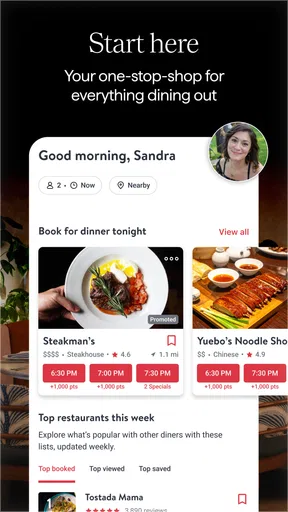
Now, onto the fun part—exploring all the features this app has to offer. The main attraction? The reservation system. You can search for restaurants by location, cuisine, or even specific dishes if you’re craving something special. It’s like having a personal concierge who knows all the best spots in town.
One feature I particularly love is the ability to see real-time availability. No more guessing games. You’ll know exactly which time slots are open. Plus, the app provides user reviews and ratings, so you know what you’re getting into before you even set foot in the restaurant.
Dining with Ease
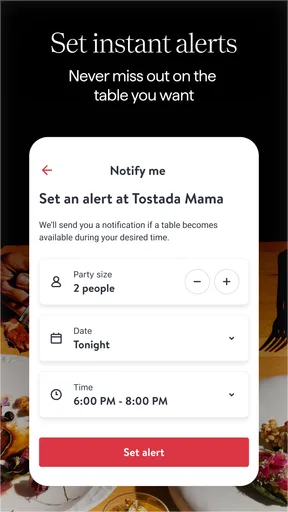
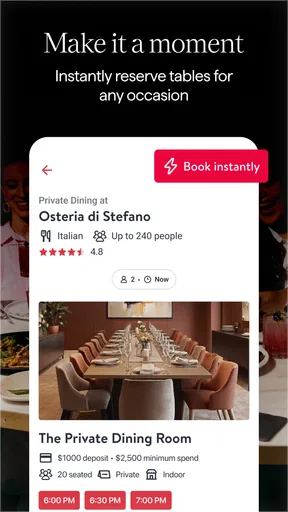
When you’re ready to make a reservation, it’s as simple as a few taps. You’ll receive a confirmation email, and you can even add it to your calendar to keep everything organized. If plans change, modifying or canceling your reservation is just as easy.
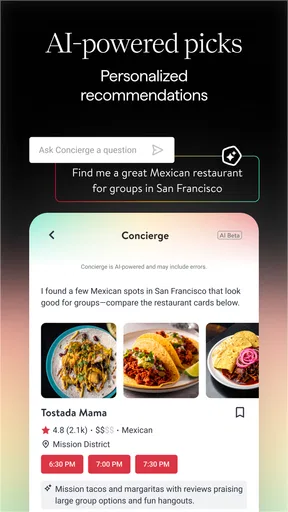
The app also offers some neat extras like personalized recommendations based on your dining history and preferences. It’s almost like it reads your mind, suggesting places you never knew existed but now can’t wait to try.
Choosing it over other ways to find a table
Compared with searching the web and then calling each restaurant, OpenTable keeps discovery and booking closer together. That makes it a good fit when I care about seeing available times before I commit. A general map search can be better when I mainly need directions, want to compare businesses broadly, or have a specific place in mind that I’d rather contact directly. I see the two approaches as complementary: use OpenTable to explore and reserve where it fits, and use a map or the restaurant itself when the task is about navigation or direct confirmation.
It is also not the right choice for every diner. If I prefer to walk in spontaneously, rarely make reservations, or already know exactly where I’m going, the app may add little to my routine. Likewise, someone who wants to make a last-minute decision in an area with poor connectivity should have a backup plan rather than count on live search working at that moment. Its strongest case is for people who value comparing restaurant options and securing a time ahead of arrival.
Why You’ll Love It
One of the standout aspects of OpenTable is its user-friendly interface. It’s sleek, intuitive, and makes the whole process of dining out feel effortless. The app not only saves you time but also opens up a world of culinary possibilities.
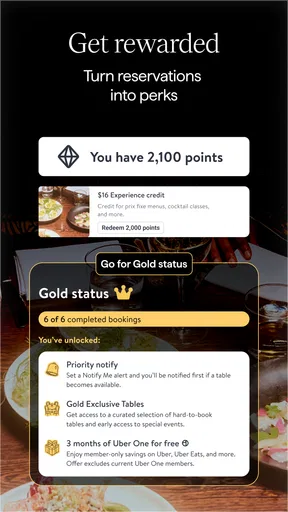
And, let’s not forget the rewards program. Every reservation earns you points that can be redeemed for dining vouchers. It’s like getting a little bonus just for eating out. Who wouldn’t love that?
Lastly, the customer support is exceptional. If you ever encounter a hiccup, they’re just a call or message away. Knowing there’s a reliable team to back you up adds a layer of comfort to the whole experience.
Details that matter before you rely on it
The app has a 4.6 average from around 185,000 ratings, and it has been installed over 10 million times. Those figures suggest that it is a well-established option, though popularity alone cannot tell me whether a particular restaurant is right for my plans. I still check the details that matter to me and make sure the time works before I confirm.
OpenTable is rated for everyone, and version 26.5.2 is listed for devices running Android 8.0 or later. If I’m helping someone else arrange dinner, I’d check that their phone can run it before making the app central to the plan. For a straightforward reservation, the app is approachable; for someone who does not want to create or use an account, the restaurant’s own booking or phone option may feel more direct.
One useful way to avoid friction is to decide what counts as a good alternative before searching. I might prioritize a convenient location first, then cuisine, then the exact time; someone planning a special meal may reverse that order. Setting those priorities keeps the live results from turning into endless browsing and makes it easier to act when a suitable opening appears.
Final Thoughts
In a world where convenience is king, OpenTable reigns supreme for foodies. It takes the stress out of reservations and elevates your dining experience to a whole new level. Whether you’re planning a romantic dinner or a casual brunch, this app has got you covered.
So, what are you waiting for? Download OpenTable and start exploring the culinary world with ease. Your taste buds will thank you, and your social life might just get a little more exciting too!
My connectivity verdict
I recommend it to anyone who regularly plans meals out and wants to compare restaurants and available times in one place. Its live search is the central advantage, while the need for a working connection is the main practical limitation. I’d browse and book before heading into a place where reception may be uncertain, keep the confirmation easy to retrieve, and use direct contact as a backup when plans need urgent attention. Used that way, it is a convenient reservation companion—not a substitute for every way of finding a restaurant.
Pros
- User-friendly interface enhances booking experience.
- Real-time table availability updates.
- Offers personalized restaurant recommendations.
- Integrated with Google Maps for easy navigation.
- Loyalty points for frequent diners.
Cons
- Limited options in smaller towns or rural areas.
- Occasional app crashes reported by users.
- Some restaurants have inaccurate availability.
- Requires internet connection for bookings.
- Limited customer support response time.
FAQs for OpenTable
What is OpenTable and how does it work?
OpenTable is a reservation platform that allows users to book tables at restaurants seamlessly. It provides a user-friendly interface to search for available dining options by location, cuisine, or price range. Users can view restaurant reviews, menus, and make reservations directly through the app without needing to call the restaurant.
Is OpenTable free to use for making reservations?
Yes, OpenTable is free for users making reservations. There are no charges for booking a table through the app. Restaurants pay a fee to OpenTable for each reservation made, allowing users to benefit from the service without any cost. However, some premium features or offers might incur additional charges.
Can I earn rewards or points using OpenTable?
Yes, OpenTable offers a rewards program where users can earn points for each reservation made and honored. These points can be redeemed for dining rewards or used towards discounts at participating restaurants. The app provides details on how to accumulate and use these points effectively.
What happens if I need to cancel a reservation on OpenTable?
Canceling a reservation on OpenTable is straightforward. Users can manage their bookings directly through the app by accessing their reservation details and selecting the cancel option. It’s important to cancel in advance to avoid potential penalties or impacts on your user rating within the app.
Does OpenTable offer customer support if I encounter issues?
Yes, OpenTable provides customer support to assist users with any issues they might encounter. Whether it’s a problem with the app, a reservation error, or a need for additional information, users can contact the support team via the app or website for prompt assistance.


